td/tech Software for older Macs and RTL-SDR radios. Classic edition.
Clearwave Legacy Public Beta 1
FM, AM and NOAA weather radio for Mac OS X 10.5, on PowerPC G5 and Intel Macs.
Clearwave rebuilt as a native Cocoa app for Leopard, so a Power Mac G5 or an older Intel Mac can be a proper radio. It finds the cleanest gain on its own, shows how good the signal really is, and tells you which station you're hearing and why it thinks so.
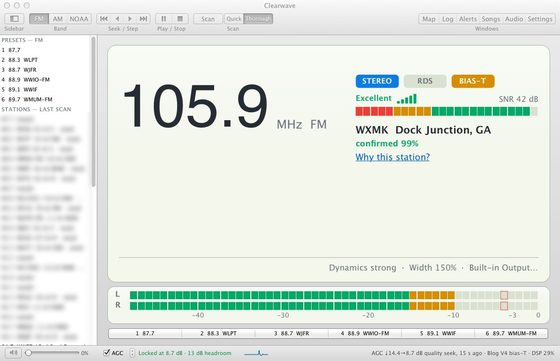 Clearwave Legacy 0.5i on Leopard after a Thorough scan.
Features
- FM stereo with RDS, NOAA weather radio with SAME alerts, and AM
- Quality seek: after locking it tries gain settings around the lock point and keeps the cleanest
- Scan scores each station from 0 to 100 and flags junk and image signals
- Signal meter in real dB of signal-to-noise, with a stereo/blend/mono badge
- Offline station map, FCC station ID and a DX logbook
- Per-dongle settings, hiss reduction and an adjustable audio buffer
Details
| Version | 0.5j, Public Beta 1 (October 10, 2026) |
| Runs on | Mac OS X 10.5 Leopard to 10.7 Lion, PowerPC G5 and Intel (universal) |
| Needs | An RTL-SDR dongle (tested with the RTL-SDR Blog V4) |
Download
Clearwave Legacy 0.5j Public Beta 1 - installer (PowerPC G5 and Intel)
Disk image, 5.3 MB. Open it and double-click "Install Clearwave Legacy", or drag Clearwave to Applications.
SHA-256: 8b4b10c351ab45fca06fd00bb7c3cf1c84b2a06e5497e8b6ab5554f94be4b115
App only (zip)
Zip archive, 2.6 MB. Unzip it and drag Clearwave to your Applications folder.
SHA-256: cf51bb314e297ba6d37a281538a0fa22b59cc5d3fd6e63e4f5d906ba25608be4
Needs Mac OS X 10.5 or later and an RTL-SDR dongle. On 10.7 Lion, open Clearwave the first time with Control-click > Open.
Already have Clearwave 0.5j? Use Clearwave > Check for Updates… instead.
Disk image, 5.3 MB. Open it and double-click "Install Clearwave Legacy", or drag Clearwave to Applications.
SHA-256: 8b4b10c351ab45fca06fd00bb7c3cf1c84b2a06e5497e8b6ab5554f94be4b115
App only (zip)
Zip archive, 2.6 MB. Unzip it and drag Clearwave to your Applications folder.
SHA-256: cf51bb314e297ba6d37a281538a0fa22b59cc5d3fd6e63e4f5d906ba25608be4
Needs Mac OS X 10.5 or later and an RTL-SDR dongle. On 10.7 Lion, open Clearwave the first time with Control-click > Open.
Already have Clearwave 0.5j? Use Clearwave > Check for Updates… instead.
About downloading over plain HTTP: this page and its downloads are not encrypted, so on an untrusted network (public Wi-Fi) someone could swap the file. If you can, download on a trusted home network, or compare the SHA-256 above with the one listed on downloads.tdtech.org from a modern computer. After the first install, Clearwave's built-in updater is safe even over HTTP: every update is checked against a digital signature and a SHA-256 checksum before anything is installed.
This is the plain version of tdtech.org for older computers (no scripts, works over plain HTTP).
On a modern browser, use https://tdtech.org/. Updated October 2026.